Description
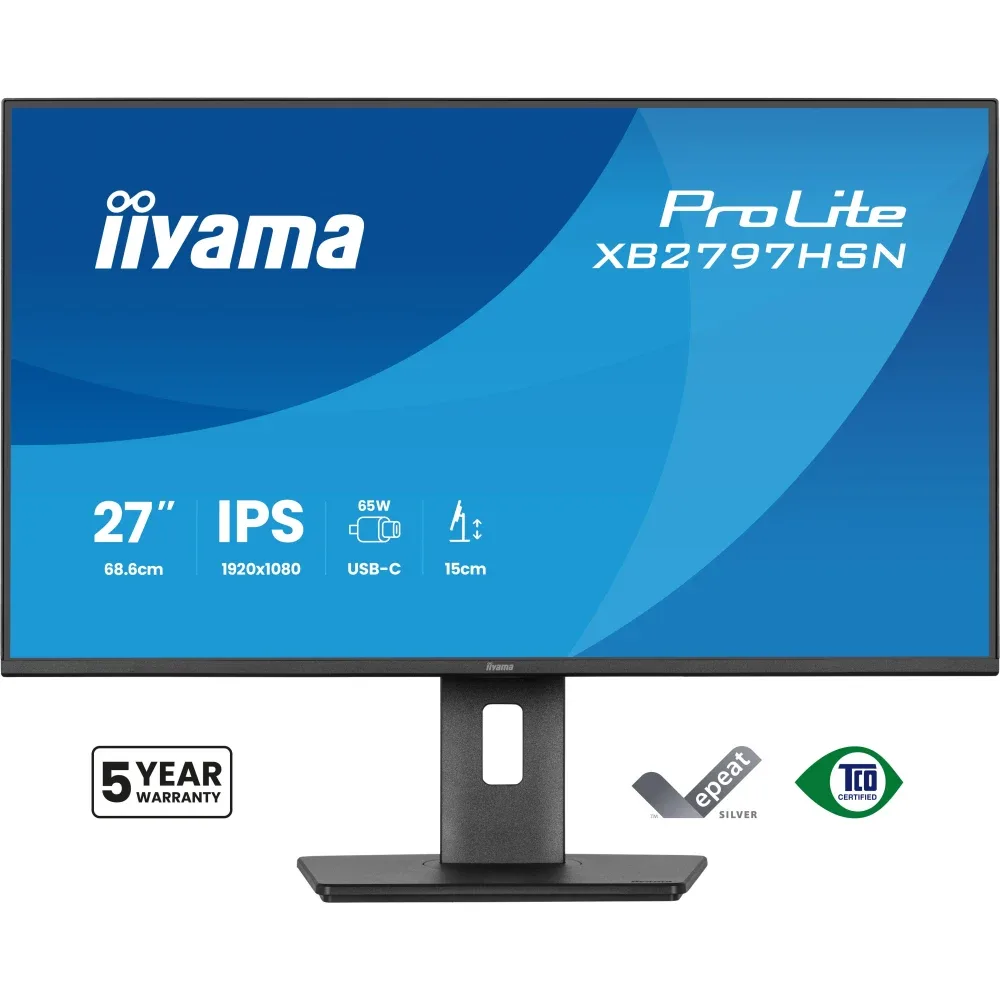
iiyama ProLite 27” Full HD monitor with USB-C docking and LAN that simplifies your daily setupDesigned for modern professionals who value efficiency and a clutter-free workspace, the ProLite XB2797HSN brings smart connectivity and reliable performance together in a versatile 27” display built for everyday business use.
The integrated USB-C dock with 65W Power Delivery allows you to transmit video, audio and data while simultaneously powering your laptop through a single cable. This streamlined solution keeps your desk tidy, reduces cable clutter and makes hot-desking quick and effortless. The built-in RJ45 (LAN) port ensures a stable wired network connection directly via the monitor, removing the need for additional adapters and supporting consistent performance throughout the working day.
The 27” Full HD IPS panel (1920×1080) delivers clear, detailed visuals and accurate colour reproduction with wide viewing angles, making it ideal for office applications, document handling, web-based tasks and day-to-day multitasking. A DisplayPort output enables easy daisy-chaining for a dual-monitor setup, helping you expand your workspace and improve productivity with minimal effort.
A 15cm height-adjustable stand with tilt, swivel and pivot functions, including portrait mode, allows you to customise the screen position for optimal ergonomics. TUV Rheinland Eye Comfort certification confirms reduced blue light emissions and flicker-free technology, supporting comfortable viewing and sustained focus during long working hours.
USB-C dock for tidy desk & easy connectivityConnect everything with just one cable - handle video, data, and power while keeping your desk clean and organized.
Adjustable stand for optimal comfortFind your perfect screen position easily and maintain a healthy, comfortable posture all day long. Thanks to its fully adjustable stand, you can effortlessly adapt the monitor to your needs. Raise or lower the height, swivel left or right, or tilt the screen to reduce glare and find the optimal viewing angle. Whether you're working, designing, or attending long video calls, this flexibility helps reduce neck and back strain, improving both comfort and productivity throughout your day.
Built-in audio without extra clutterEnjoy clear, pleasant sound for calls, videos, and music while keeping your desk free of extra speakers, thanks to the integrated audio.
Feel the difference with certified eye comfortHardware-based low blue light built into the panel, flicker-free technology and true-to-life colour accuracy all work together to support more comfortable viewing throughout the day. Backed by TUV Rheinland Eye Comfort certification, this display lets you work, browse and create for longer with greater ease.
Versatile connectivity for all your devicesConnect multiple devices and accessories in one simple step with HDMI, DisplayPort and the USB hub, streamlining your workspace for maximum efficiency and ensuring a tidy, uninterrupted workflow.
SpecificationsDisplay CharacteristicsDesign4-side slim bezel
Diagonal27", 68.6cm
PanelIPS Panel Technology LED, matte finish
Native resolution1920 x 1080 @100Hz (2.1 megapixel Full HD)
Aspect ratio16:9
Panel brightness350 cd/m²
Static contrast1500:1
Advanced contrast80M:1
Response time (MPRT)1ms
Viewing zonehorizontal/vertical: 178°/178°, right/left: 89°/89°, up/down: 89°/89°
Colour support16.7mln (sRGB: 99%; NTSC: 72%)
Horizontal Sync30 - 115kHz
Viewable area W x H597.9 x 336.3mm, 23.5 x 13.2"
Pixel pitch0.311mm
Colourmatte, black
Interfaces/Connectors/ControlsSignal inputHDMI x1 (v.1.4)
DisplayPortx1 (v.1.2)
USB-C x1 (PD 65W)
USB HUBx4 (2x Type-A v.3.2 Gen 1 (5Gbps, 4.5W) 2x Type-C (5Gbps, 7.5W))
USB-C DOCKx1 (Power delivery 65W, LAN, DP out, USB v.3.2 (Gen 1, 5Gbit))
HDCPyes
Headphone connectoryes
RJ45 (LAN)x1
FeaturesFlicker freeyes
Adaptive Sync supportyes
Extrai-Style colour, Eye Comfort
OSD languagesEN, DE, FR, ES, IT, RU, JP, CZ, NL, PL, UA
Control buttonsJoystick: Power/Menu (Centre), Up/Signal Select, Down, Left/Shortcut, Right/Volume
User controlspicture adjust (brightness, contrast, ECO, ACR, OD, MBR, Adaptive Sync), colour settings (i-Style colour, RGB range, colour temp., user preset), OSD (OSD H. position, OSD V. position, OSD rotate, OSD time, OSD background, DDC/CI control, display information), language, extra 1 (sharpness, video mode adjust, opening logo, power LED, USB charge, USB-C speed, MST DP-out), extra 2 (shortcut key, Mac address, FW version), input select, audio settings (volume, mute), reset (reset all?)
Speakers2 x 2W
ConvenienceKensington-lock prepared, DDC/CI, DDC2B
MechanicalDisplay position adjustmentsheight, swivel, tilt, pivot (rotation both sides)
Height adjustment150mm
Rotation (PIVOT function)90°
Swivel stand120°; 60° left; 60° right
Tilt angle23° up; 5° down
VESA mounting100 x 100mm
Cable management systemyes
Accessories IncludedCablespower (1.5m), HDMI (1.5m), USB-C (1.0m)
Other
quick start guide, safety guide
Power Management
Power supply unit
internal
Power supply
AC 100 - 240V, 50/60Hz
Power usage
17W default, 0.5W stand by, 0.3W off mode
Sustainability
Regulations
TCO Certified, CE, TÜV-GS, EAC, VCCI-B, PSE, RoHS support, ErP, WEEE, REACH, UKCA
Energy efficiency class (Regulation (EU) 2017/1369)
D
EPEAT Silver
*registration varies by country, go to www.epeat.net for details
REACH SVHC
above 0.1%: Lead, Lead monoxide, Diboron trioxide
Warranty
5 years (for details and eligible countries please check the Warranty section of our website)
Dimensions/Weight
Product dimensions W x H x D611.5 x 403.5 (547.5) x 209.5mm
Box dimensions W x H x D691 x 447 x 142mm
Weight (without box)5.4kg
Weight (with box)8.0kg
EAN code
4948570125913
Key Features
- Screen Size (in): 27
- Max Resolution: 1920 x 1080
- Refresh Rate: 100Hz
- Response Time: 1ms
- Display Port: Yes
- Height Adjustable: Yes
- Curved Screen: No
Category: Monitors
Manufacturer Code: XB2797HSN-B1
EAN: 4948570125913
Weight (KG): 5.4
VAT Rate: 20%